1-on-1 Coaching
Best Employee Documentation Software in 2026
Employee documentation software is not one product. It is two jobs that share a name: storing HR files, and recording how managers coach.
Key takeaways
- Employee documentation software covers HR file administration and day-to-day performance documentation, and those jobs need different tools.
- HR document management stores contracts, policies, signatures, and the official employee file.
- Employee coaching and performance documentation records observations, incidents, coaching conversations, and follow-ups.
- Docu-Coach™ is built for the coaching record. It is not payroll, e-signature, or an HRIS.
- A manager can capture a short voice note on a phone and review that history before the next conversation.
- Employee documentation software helps an organization record or store information about employees.
Employee documentation software helps an organization record or store information about employees. The useful choice depends on whether you need HR file administration or day-to-day performance documentation.
People searching this phrase are often shown contract storage, policy libraries, e-signatures, and employee-file systems. Those products solve a real job. They do not, by themselves, solve the manager's job: remembering a coaching conversation, an incident, or a follow-up weeks later.
This page separates those jobs, then compares products by the job they publicly describe. It is published by Docu-Coach™. It is not an independent ranking, and it does not award stars.
What Is Employee Documentation Software?
Employee documentation software is any system used to create, file, or retrieve records about an employee's work. The label covers more than one workflow, so a feature grid that mixes them will recommend the wrong product.
Two kinds of employee documentation software
Job A
HR document management
Contracts, policies, signatures, and the official employee file. Built for HR administration.
Job B
Coaching and performance documentation
Observations, incidents, coaching conversations, and follow-ups. Built for the manager who had the conversation.
HR document management software
HR document management software stores and routes the official file. Public examples include contracts, offer letters, handbooks, tax forms, signed policies, payslips, and personnel-file archives. These products generally cover retention, permissions, search, and e-signature. They do not generally cover a manager speaking a coaching note on the floor and finding that note before the next conversation.
Choose this category when the buyer is HR operations and the problem is paperwork: who signed the handbook, where the contract lives, and how long the file is kept.
Employee coaching and performance documentation software
Employee coaching and performance documentation software helps managers record coaching conversations, employee incidents, performance observations, and follow-up activity in an organized record.
It generally covers the note itself: what happened, what was said, and what happens next. It does not generally cover payroll, benefits, e-signature packets, or the legal archive of hiring documents.
Choose this category when the buyer is a manager, a department head, or an owner, and the problem is memory: the conversation already happened, and the detail will not survive until the next one.
Docu-Coach™ is in the second category. Restaurants, retail, healthcare, hospitality, construction, and manufacturing are acquisition examples, not a limit on who can use it. Restaurant-specific guides remain at restaurant employee documentation.
How the options compare
The rows below describe what each vendor's public pages say the product is for. "Not described on the pages reviewed" means those pages do not document the workflow. It does not mean the product is incapable of it.
| Product | Primary job on the public pages reviewed | Coaching or performance notes | HR files, e-sign, or payroll | Best fit |
|---|---|---|---|---|
| Docu-Coach™ | Manager coaching and performance documentation | A short voice note becomes a structured record on the person's timeline, with follow-ups | Not payroll, e-signature, or a contract archive | Managers who need conversation, incident, and follow-up history |
| BambooHR | HRIS employee files and e-signatures | Not described on the documents help page reviewed | Document folders and e-signatures are documented | Teams filing the official employee record and onboarding paperwork |
| Rippling | HRIS, payroll, and HCM | A separate performance-management product is listed. The HRIS document feature is described as storage, signatures, and audit trails | Payroll and document management are core | Companies that want payroll, HRIS, and file administration together |
| Deel | Global HRIS and workforce documents | The glossary lists performance reviews as a document type inside HR document management | Worker profiles, documents, and payroll | Employers managing contracts, onboarding, and global worker files |
| Factorial | HR document workflows | Not described as day-of-conversation capture on the document-management page | Folders, templates, bulk send, e-signatures, and payslips | HR teams distributing and filing employee documents |
| DocuWare | Document management for personnel files | Performance reviews can be stored as files | Personnel-file storage, retention, and access control | Organizations digitizing contracts, payslips, and personnel archives |
| Lattice | Performance management: goals, feedback, reviews, and 1:1s | 1:1 agendas, updates, and feedback are documented for managers | Not positioned as payroll or a personnel-file archive | Companies running a formal performance cycle and scheduled 1:1s |
Updated October 19, 2026. Sources are linked in How this comparison was checked. Competitor prices are not compared here because public packaging changes and several of these products are quote-based.
Docu-Coach™ Manager is $9.98 per month for up to 25 people. Free covers 2 people. Teams is $250 per month. Every new account starts with a 30-day Manager trial and no card.
Notes apps, spreadsheets, and a one-off write-up template still hold a lot of real history. A note app captures a sentence and then loses it in the phone. A spreadsheet can list incidents and still hide who changed a cell. A template produces one document and does not keep the trail. Those gaps are walked through in Docu-Coach™ vs spreadsheets and Docu-Coach™ vs Google Drive.
When managers choose Docu-Coach™
Choose Docu-Coach™ when the record you need is the conversation, not the contract.
A manager finishes a difficult conversation and records what was observed, what was agreed, and the follow-up. Docu-Coach™ structures that note and files it on the employee's timeline. Before the next conversation, the manager opens the history instead of reconstructing it from memory. The native iOS app is the capture companion. The web application is where that history is reviewed, organized, and prepared for the next conversation.
The same record can be an incident, positive feedback, a daily note, or a progress update. Follow-ups sit on the record. Prep Me and HR Ready compile notes that were already saved. They are not a place to invent witnesses, quotes, or dates. A performance improvement plan can be drafted from history the manager already captured. See employee coaching documentation software for the product workflow, and how to document employee coaching for the note itself.
Docu-Coach™ is a poor fit if the buying committee needs payroll, benefits administration, e-signature of hiring packets, or a scanned personnel-file archive. Those are the next section.
When an HRIS or document system is the better fit
Choose an HRIS or a document-management system when the job is the official file.
- Payroll, tax forms, and benefits belong in an HRIS such as the Rippling or Deel products linked below.
- Signed contracts, handbooks, and onboarding packets belong in a system that documents e-signature and folder structure, such as BambooHR or Factorial.
- Retention, access control, and a digitized personnel archive are what DocuWare's HR document pages describe.
Manager documentation and an HRIS can sit side by side. The HRIS holds employment and the signed file. Docu-Coach™ holds the coaching and incident history the HRIS was not asked to capture in the moment. Employee documentation software for managers describes that split from the product side.
If the need is a formal review cycle, goals, and scheduled 1:1 agendas, read Lattice's manager guide before assuming a coaching-notes product replaces it. The jobs overlap at "a note about performance" and diverge at "a system of record for the review cycle."
From a spoken note to the next conversation
Capture → Organize → Follow up
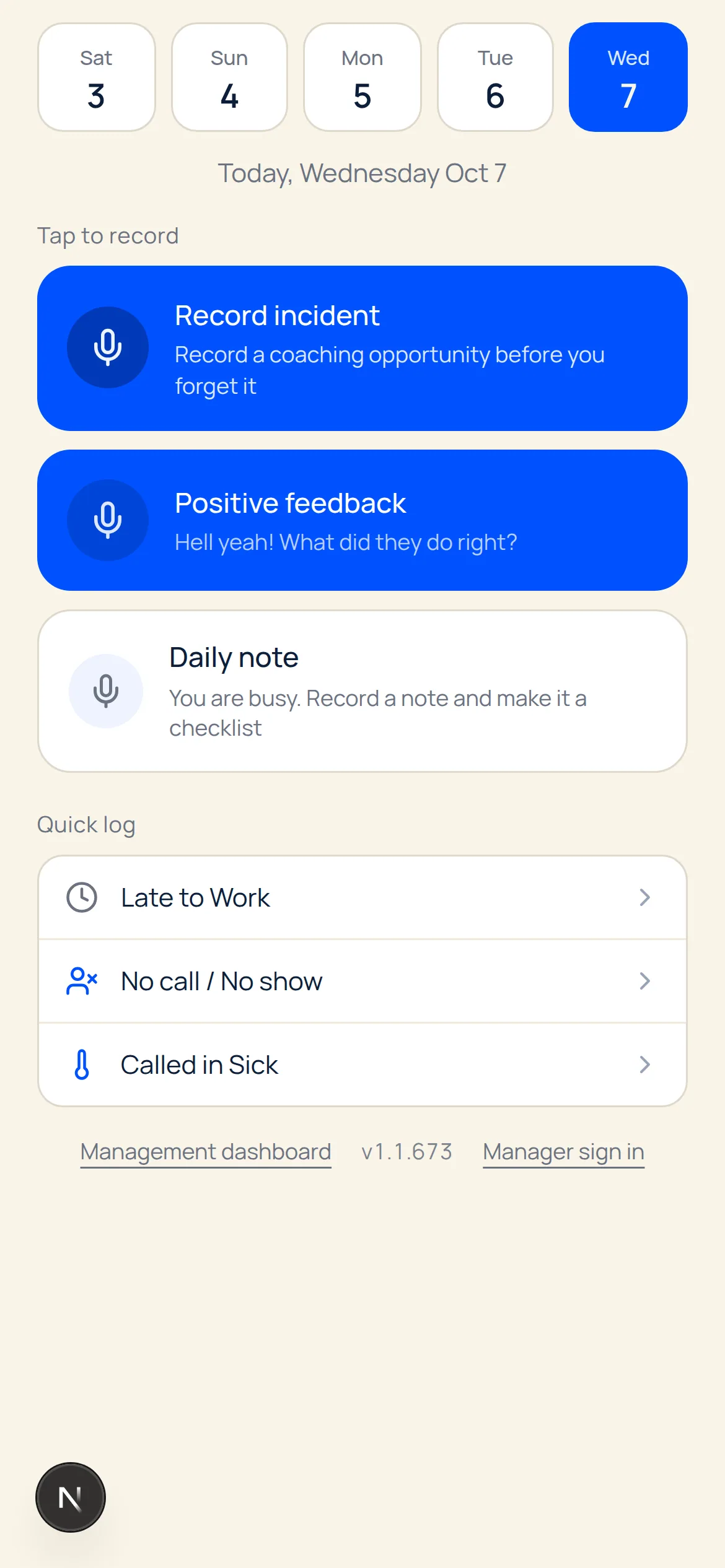
1. Capture the observation on the phone 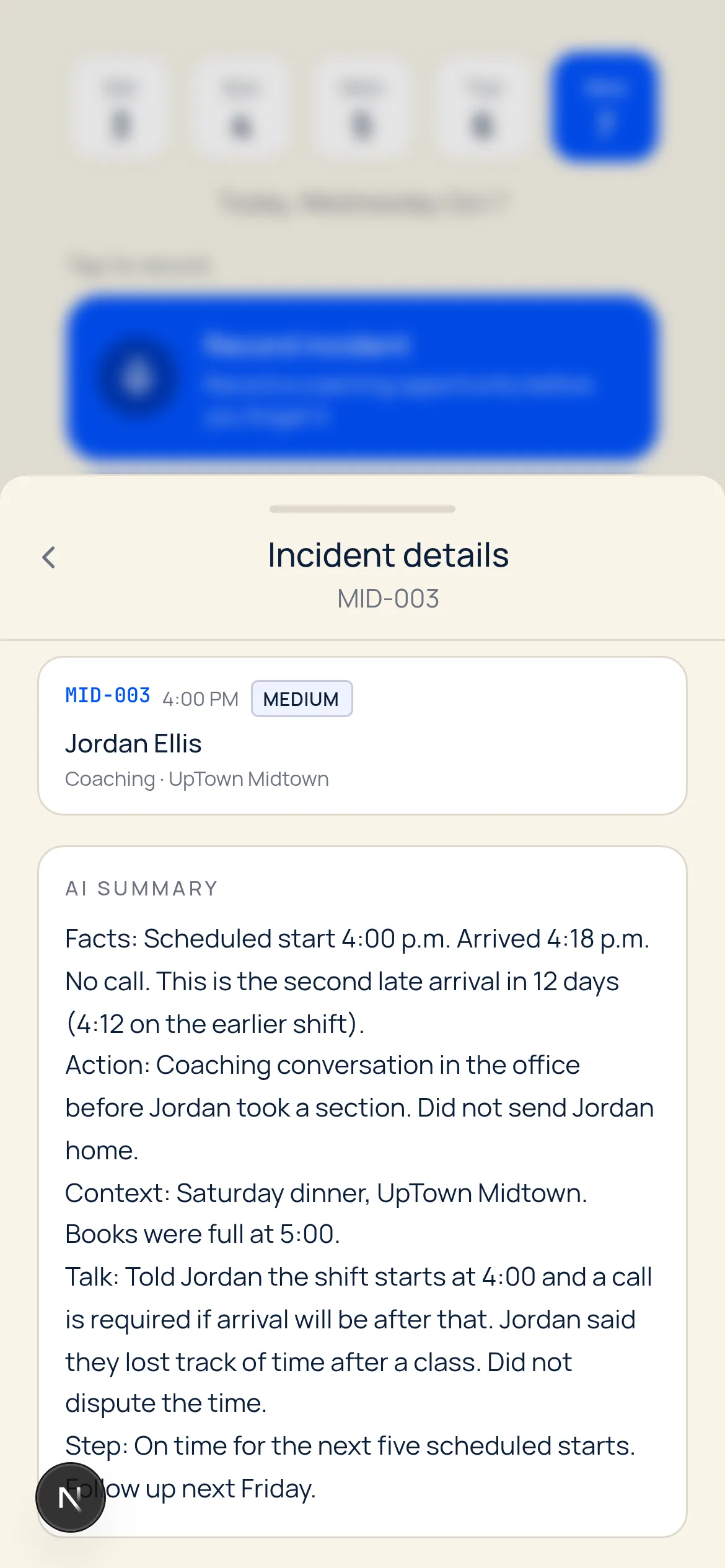
2. Review the structured employee record 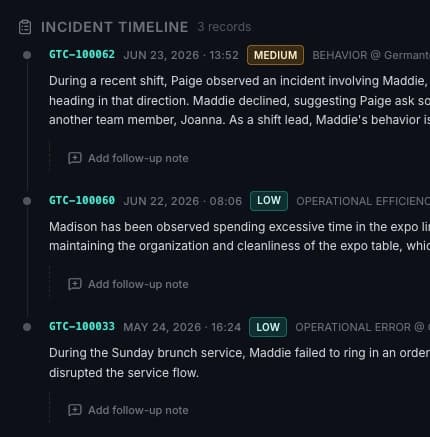
3. Open the history before the next conversation
The screens below are the product, not a mock. Capture starts on the phone. The structured record and the timeline are what a manager reviews later.
- Capture. Open the record screen and say what happened. The same screen offers an incident, positive feedback, and a daily note. A voice note is about ten seconds. The original audio stays with the record.
- Organize. The note is structured and filed on that person's timeline, with the date and the fields a later reader needs.
- Follow up. Each record can carry a follow-up. The next conversation starts from that history.
Free drafts for a single document live at the employee write-up generator and the performance improvement plan generator. Those tools run in the browser and do not save a history. The product does.
How to pick
You need the coaching and incident history → employee coaching documentation software. That is the job Docu-Coach™ is built for.
You need the official employee file → an HRIS or document system in the table above, plus a capture habit if managers still reconstruct conversations from memory.
You need both → keep both. Do not expect the file cabinet to remember the conversation, or the coaching note to store the W-4.
You are comparing performance-management suites → start with the question "where does a note go on the day it happens?" A review platform that assumes a scheduled 1:1 is a different workflow from a note captured between conversations.
How this comparison was checked
Competitor descriptions were taken from public pages reviewed on October 19, 2026. No row is a paid placement. Docu-Coach™'s row describes the product this site sells, including the iOS capture screens and the timeline shown above.
- BambooHR, Files vs. Documents: help.bamboohr.com. E-signature topic: Documents and E-Signatures.
- Rippling HRIS, including the document-management line "store documents, collect signatures, and track audit trails": rippling.com/products/hr/hris. Performance Management is listed as its own product on rippling.com/products/hr.
- Deel defines HR document management as storing employee documents such as files, performance reviews, and benefits information: deel.com/glossary/hr-document-management. The HRIS page describes worker profiles, documents, and workflows: deel.com/solutions/hris.
- Factorial document management describes folders, templates, bulk send, e-signatures, and payslips: factorialhr.com/document-management.
- DocuWare's HR document page describes personnel files, contracts, payslips, retention, and access control: start.docuware.com.
- Lattice's manager guide describes goals, feedback, reviews, 1:1 agendas, and updates: Lattice Help Center.
Related reading: employee performance notes, employee incident tracking, and performance improvement plan software.
Frequently Asked Questions
What is employee documentation software?
Employee documentation software is software that helps an organization create, store, or retrieve records about employees. Some products store HR files such as contracts, policies, and signed forms. Others help managers record coaching conversations, incidents, performance observations, and follow-ups. The right choice depends on which of those jobs you need done.
What is the difference between employee documentation software and HRIS software?
An HRIS is the system of record for employment: the person profile, job data, time off, payroll, and often the official document file. Employee coaching documentation software records what a manager observed and what was agreed next. Many organizations use both. Docu-Coach™ does not replace payroll or the HRIS.
How do managers document employee coaching conversations?
A useful coaching note names the person, what was observed, when it happened, and what each person agreed to do next. In Docu-Coach™, a manager can say that in a short voice note. The product structures the note onto that person's timeline so it can be reviewed before a later conversation.
Can employee documentation software track verbal warnings?
A verbal warning is still a conversation. Software can keep a dated note of what was said, what standard was discussed, and what the follow-up is. That is a management record, not a determination that the note is legally sufficient. Confirm any discipline step with your own policy and, when it matters, with employment counsel.
What should managers include in employee performance notes?
Include the observable behavior, the date, the context a later reader would need, and the agreement or next step. Leave out character labels such as lazy or unprofessional. Those words are conclusions. The note should say what happened.
Can employee documentation software help track coaching follow-ups?
Yes, when the product keeps the commitment next to the original note. Docu-Coach™ can attach a follow-up to a record and show follow-ups that are due, so the next conversation starts from the last agreement instead of from memory.
Is employee documentation software suitable for small businesses?
Yes. A small team has the same failure mode as a large one: the conversation happened, and the detail is gone by the next one-on-one. Docu-Coach™ is free for up to 2 people. Manager is $9.98 per month for up to 25 people, and every new account starts with a 30-day Manager trial with no card.
Related Resources
Employee Coaching Documentation Software That Remembers Every Conversation
Capture coaching moments, organize employee history, and stay prepared for follow-ups with AI-powered documentation built for managers.
4 min read
Employee Documentation Software for Managers | Docu-Coach™
Employee documentation software for managers who need coaching, incident, and follow-up history. Not payroll or an HR file cabinet. 30-day trial, no card.
3 min read
Employee Performance Notes | Docu-Coach™
Performance notes should describe observable work, dates, and agreements instead of character labels. Start a 30-day trial with no card.
1 min read
Employee Incident Tracking Software
Employee incident tracking keeps what happened, what happened before, and the next step on one timeline. For restaurants and hotels. 30-day trial, no card.
5 min read
How to Document Employee Coaching
How to Document Employee Coaching for operators and HR. Step-by-step guidance, legal risk, examples, and best practices.
2 min read
Performance Improvement Plan Software | Docu-Coach™
A PIP should start from coaching notes you already saved, not from a blank template and a memory. Start a 30-day trial with no card.
1 min read